Are you an Etisalat subscriber who wants to know how to see your loan balance in a quick manner? Regardless of whether you are a prepaid or postpaid subscriber, you have to have control over your loan balance to prevent unexpected penalties or surprises.
This guide will demonstrate to you three simple ways of checking your Etisalat loan balance:
- Via USSD code
- Via SMS
- Etisalat app
You are able to borrow and pay back your credit with ease. These are some of the few steps that will ensure you remain in charge of your Etisalat account.
What is the Etisalat Loan Balance?
Etisalat provides both prepaid and postpaid customers with the facility of borrowing a limited amount of credit in case they have a limited balance. This is a short-term loan known as the Etisalat loan, which helps you not to stop using calls, internet, and SMS services.
Who Can Get an Etisalat Loan?
- Active subscribers of the prepaid category.
- Good payment history for postpaid subscribers.
- The users should be within the eligibility criteria of Etisalat.
Benefits of Etisalat Loan
- Instant credit during emergencies
- Avoid service interruptions
- Flexible repayment options
Method 1: by Dialing *108#
This is the quickest and surest way, particularly when you are not connected to the internet.
Step-by-Step Guide
- Open the dialer on your phone
- Dial *108#
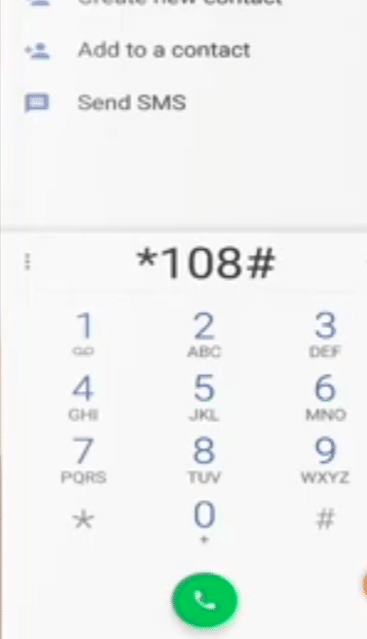
- Press the call button
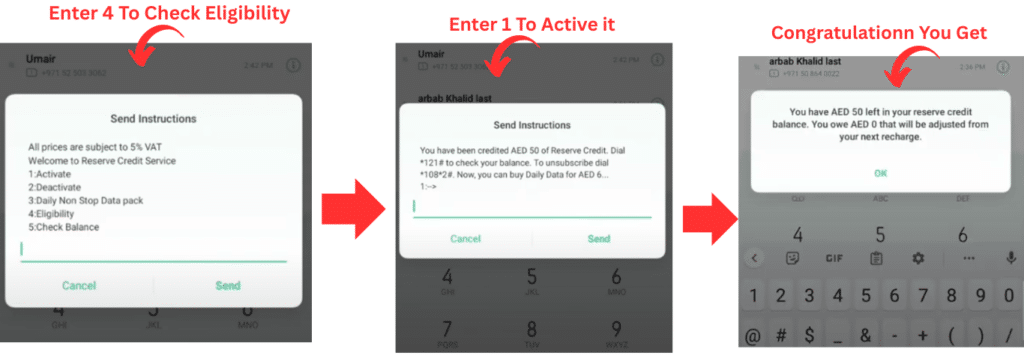
- Allow the menu to appear within a few seconds.
- Enter the choice of the loan balance.
What You’ll See
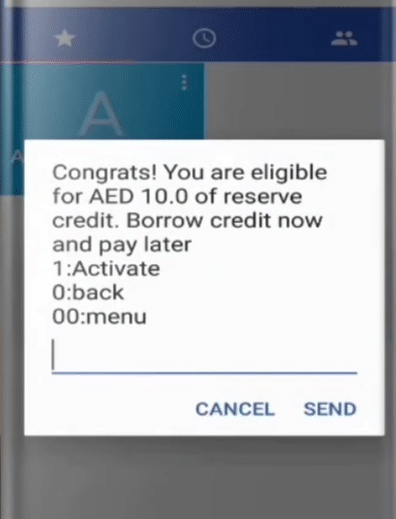
You will see a message pop up on the screen that will tell you:
- Your current loan amount
- Any service fee incurred.
- Eligibility for another loan
When I Recommend This Method
I would personally recommend such a method when:
- You’re in a hurry
- You want instant results without downloading anything
Read Also: Al Karama Bus Station: Location, Routes & Tips
Method 2: via SMS
In case you would like a more simplistic text-based approach, this is what is going to work.
Step-by-Step Guide
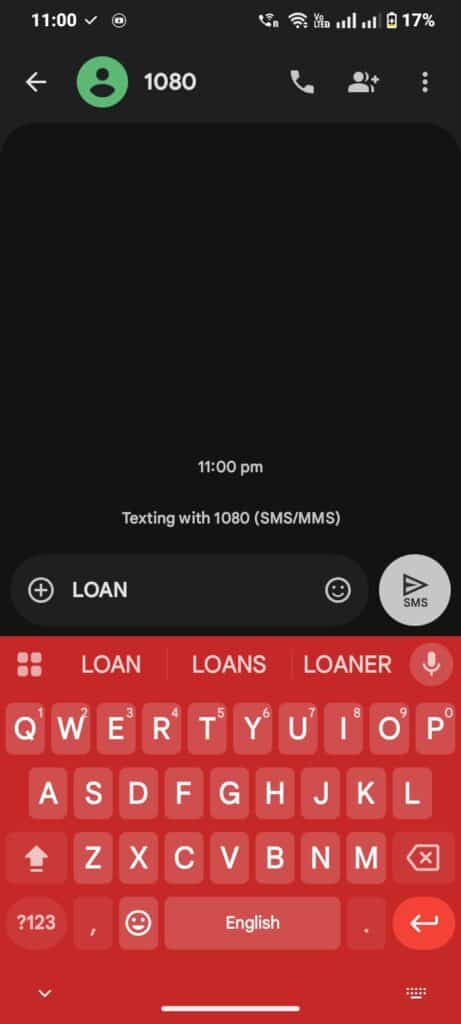
- Open your messaging app
- Type LOAN
- Send it to 1080
- Wait for a reply from Etisalat
What You’ll Receive
You’ll get an SMS showing:
- Your current loan balance
- Repayment status
- Any active emergency credit
Why This Method Is Useful
This method is great if:
- Your USSD code isn’t responding
- You would like to have a written account of your loan.
- You have a simple phone with no smart functionality.
Method 3: Using the Etisalat App
The most detailed one is the My Etisalat UAE App, in case you like to control everything in the same place.
Step-by-Step Guide
- Install the My Etisalat UAE App in the Play Store or the App Store.
- Enter your Etisalat number to log in.
- Go to the Account or Balance section
- Look for Loan / Credit Details
What Makes This Method Different
Here, you can see:
- Loan history
- Repayment status
- Available offers
- Recharge options
I use this as my preferred way of doing things in case I want to have complete control over my mobile account.
Can You Take Another Etisalat Loan?
There is no chance that you can have a new loan until you have been able to repay the previous loan. Your eligibility depends on:
- Recharge history
- Active loan status
- Usage pattern
You can check your eligibility using:
- *108#
- My Etisalat App
Common Problems and How to Fix Them
Loan Balance Not Updating
Try this:
- Restart your phone
- Use a different method (SMS or App)
- Wait a few minutes and try again
USSD Code Not Working
This usually happens due to:
- Network issues
- Temporary system updates
Use the SMS or App method instead.
Balance Deducted But Loan Still Shows Active
In this case:
- Wait up to 10 minutes
- Refresh the app
- In case it is not updated, reach Etisalat support by using the app.
Smart Tips to Avoid Emergency Loans
In my practice, the following little habits come in handy:
- Add a low-balance notification in the Etisalat App.
- Recharge before your balance hits zero
- Use Wi-Fi for heavy data tasks
- Track weekly usage
These are long-term cost-saving measures.
Common Questions About Etisalat Loan Balance
What is the length of time that the loan reflects?
Postpaid loans can be obtained in a few minutes, which is immediately available to most prepaid users.
Can I request multiple loans?
Yes, but it will be based on your account history and the eligibility criteria of Etisalat.
What will be the case if I default on repayment?
Failure to repay on time can lead to automatic deductions being made on your following recharge or billing period and even charges.
Are there any ways of checking the balance of a loan without the internet?
Yes, you can check at any time using USSD codes or using the SMS service.
Read Also: Etisalat Bus Station: Location, Routes & Tips
Final Thoughts
It is not necessarily effortless and stressful to manage your Etisalat loan balance. After learning the three easy ways to dial 3-digit codes of dialing *108 #, sending messages of LOAN to 1080, or using the Etisalat App, you are never in charge.
I have made this guide to be straightforward, straight and practical in the sense that you will never feel lost again when your balance gets depleted.


