Through international roaming, you can utilize your Du prepaid mobile numbering system when traveling abroad from the UAE. You can make and receive calls, send SMS, and utilize mobile data services in supported countries after enabling roaming without changing to another SIM card.
Du has simple methods for activating roaming services on prepaid accounts through these two key options:
- The Du official website
- The Du mobile app
Method 1: via the Du Website
You can activate international roaming through the Du website by following the steps precisely. Let me walk you through it.
Step-by-Step Guide
Step 1: Visit the Du Website
- Visit the official website of Du UAE: https://www.du.ae

Step 2: Log in to Your Account
- You should click on “Login” which is located in the top-right corner of the homepage.
Step 3: Go to the “Manage My Line” Section
- After logging in, select “My Account” from the available options.
- Navigate to “Mobile Services”.
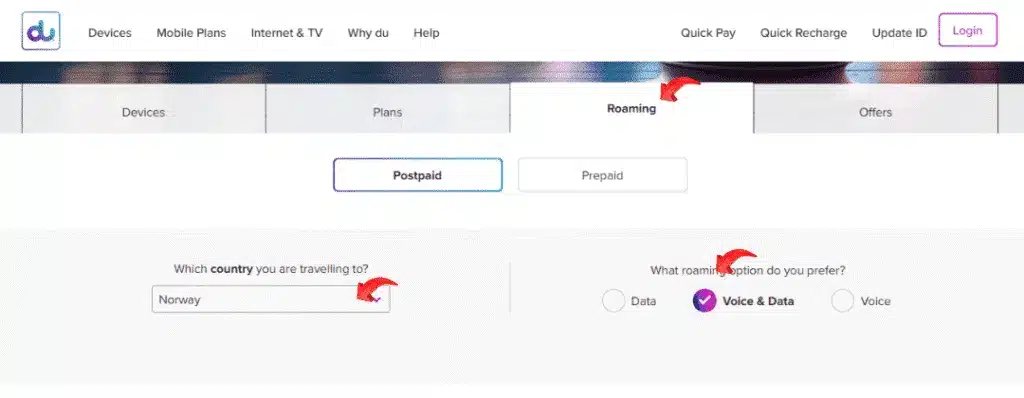
Step 4: Activate International Roaming
- Find “Roaming Services” in the list.
- In the International Roaming section, select the Activate option.
- A confirmation pop-up will appear. Click “Confirm”.
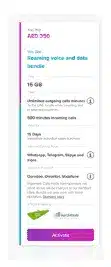
Step 5: Wait for Confirmation
- You will receive an SMS confirmation that your international roaming feature is enabled.
- The activation process proceeds immediately, yet takes a few minutes based on system traffic volume.
Read Also: Get VAT Registered in UAE – Avoid AED 10,000 Fine
Method 2: via the Du Mobile App
The Du mobile application functions as a user-friendly system to simplify account management. A few clicks through your smartphone interface will enable roaming services.

Step-by-Step Guide
Step 1: Download and Install the Du App
- If you don’t already have it, download the app:
- Search for “Du Telecom UAE“ and make sure you install the official app.
Step 2: Log In to Your Account
- Open the application, after which you must enter your mobile number and password for login.
- New users must register with their Du prepaid number, followed by OTP verification during their first time usage.
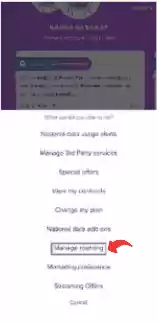
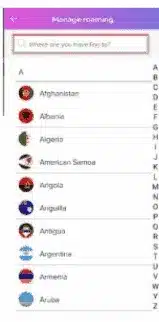
Step 3: Navigate to Roaming Services
- The Roaming section can be found on the home screen.
- To view roaming options, select the “Roaming” section on the home screen and then tap on it.
- You can pick various regions and countries from the list of options.
Step 4: Select and Activate a Roaming Bundle
- Go through the available international roaming package options.
- Choose a bundle package according to your travel location and estimated time of usage.
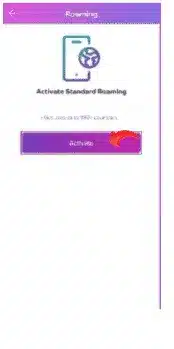
- Tap on “Activate” or “Subscribe”.
Step 5: Confirmation
- The application displays a confirmation message after its activation.
- You will receive an SMS confirming the activation of your international roaming services.
Tips for Using the Du App Effectively
- Ensure your application operates on its current version.
- The real-time updates become accessible by enabling push notifications.
- Enabling location access features will let Travelocity recommend deals based on your current destination.
Things You Need to Know Before Activating Roaming
1. Is International Roaming Available for All Prepaid Users?
- Your account balance must be sufficient to enable this feature.
- Anyone interested in checking data limits with Du support should consult with their Du team.
2. How Much Balance Do You Need?
- You have to spend at least AED 100 while roaming, depending on your destination choice among the available bundles.
3. Can You Activate Roaming Outside the UAE?
- It is best to activate roaming services before departing from the UAE.
- When you are on Wi-Fi, you can also turn on roaming services in other countries using the Du app.
4. What Happens If You Run Out of Data?
- When you surpass your data limit according to your package, your internet service is terminated.
- This will mean that you need to buy an additional bundle to keep using data while roaming.
Common Issues and How You Can Fix Them
Problem 1: Can’t Log in to the Du Website or App
- Solution: Reset your password via OTP.
- Pro tip: You should enable JavaScript in Chrome or Safari.
Problem 2: Roaming Not Working After Activation
- Solution: Restart your phone.
- Activating Data Roaming through your phone network settings is essential for proper usage.
- Verify that your current network connection belongs to the list of supported network partners located in your destination country.
Problem 3: Insufficient Balance
- Solution: Try after you recharge your prepaid account through the Du app or website, or at retail stores.
Problem 4: Activation Button Not Showing
- Solution: The current activation of roaming might be in effect.
- Contact the Du customer care because your number could be ineligible for roaming services.
Du Roaming Bundles: What Are Your Options?
Du presents various roaming bundle packages suitable for different territorial areas. These bundles include:
- Daily Roaming Bundles – Valid for 24 hours.
- Weekly Roaming Bundles – Last for 7 days.
- Monthly Roaming Packs – Best for long trips.
- Data-Only Bundles – Ideal if you don’t need to make calls.
See the country list of your bundle because not all bundles operate in every nation.
Read Also: Urgent! Get Your Daman Health Continuity Certificate Fast
Final Thoughts
I believe this guide clarified the steps to enable Du prepaid international roaming functions without technical language, and with practical strategies you can implement. Both the Du website access and mobile application provide you with efficient ways to control your network connectivity.
Remember, preparation is key. You need to do this by going to your gadget before traveling, enabling the roaming feature, ensuring that you have enough data on your phone, and selecting the package that matches your traveling needs.