Visa validity checks in the United Arab Emirates (UAE) become accessible without difficulty through the Federal Authority for Identity and Citizenship (ICA) Smart Services portal. Citizens of the UAE and visitors must understand their visa status because it remains essential for immigration law obedience.
In this comprehensive guide, I will take you through the step-by-step process of checking your visa validity using the ICA Smart Services portal.
How to Check Smart Services Visa Validity via ICA?
Step 1: Access the ICA Smart Services Portal
- Open your web browser and go to the ICA Smart Services website: ICA Smart Services Portal.
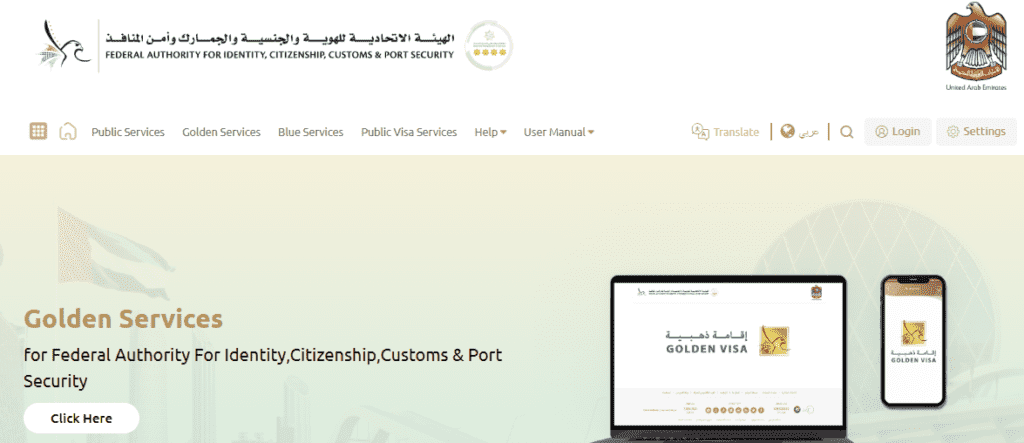
- The official government website for UAE visa inquiries and services functions through the online ICA Smart Services Portal.
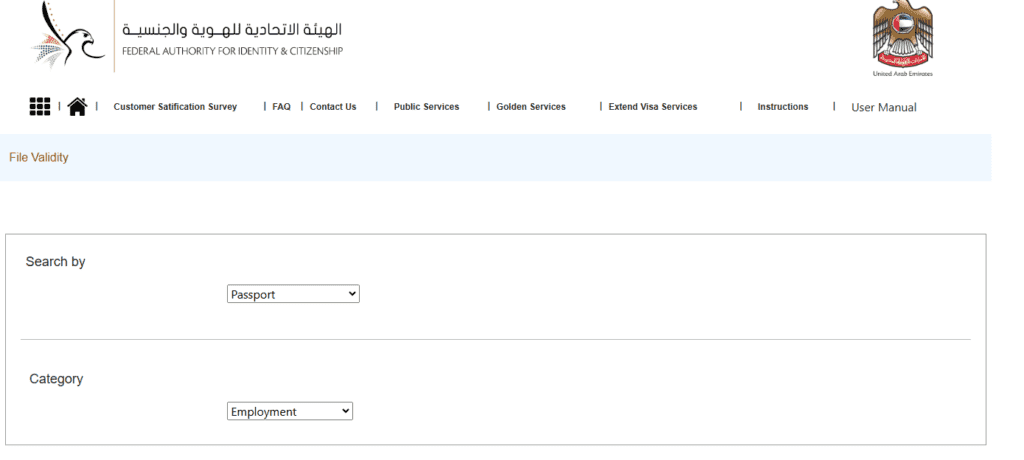
Step 2: Select “Passport Information”
- Navigate to the homepage, where you will find the “Passport Information” button.
- The system enables users to verify their visa status by entering passport information.
Step 3: Choose “Visa” or “Residency”
- Choose one of the given options according to the type of visa you possess.
- When checking a visit visa or e-visa, or an entry permit, you should select “Visa” as your option.
- “Residency”: Users should select the “Residency” option when their passport contains a valid residence visa.
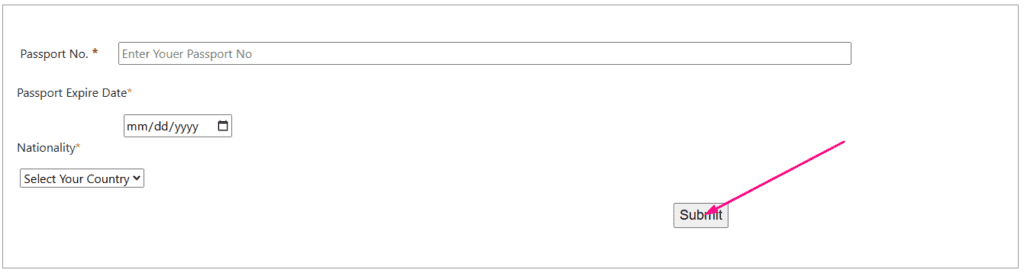
Step 4: Enter the Required Details
- Enter your passport number correctly.
- Enter your passport expiry date.
- The system requires you to choose your country from the provided drop-down menu.
Step 5: Verify and Search
- Solve the captcha verification to confirm you are not a robot.
- Proceed with the search operation by pressing the “Search” button.

Step 6: View Visa Details
Each correct entry in the system leads to the display of your visa data, including the following information:
- Visa Expiry Date: Visa Expiry Date provides the necessary information about your visa validity duration.
- Visa Type: The visa type section displays the particular category that received your visa authorization.
- Other Important Information: Finally, the system shows detailed information about your visa, including additional notes provided by the authorities.
Read Also: Find Mashreq Bank Branches & ATMs in Dubai Near You!
What to Do If Your Visa is Expired or Invalid?
Follow these procedures if your visa exists or becomes invalid:

1. For Visit Visa Holders
- Visitors with expired visit visas have two options: they must leave UAE territory or file an extension request before the time extension ends.
- Overstaying can result in daily fines, so act promptly.
2. For Residence Visa Holders
- Verify whether there is an active grace period for your invalid residency visa.
- Seek renewal of your visa from your sponsor or direct it through your employer.
- If you have switched jobs, ensure your new visa process has started.
3. If You Encounter Errors in Checking Visa Validity
You must follow these steps in case you encounter problems when checking your visa validity:
- Check that the passport information you type matches the records exactly.
- Refreshing the current webpage or switching to another internet browser will help.
- Contact the ICA customer support for assistance.
Tips for a Smooth Experience
Several useful recommendations exist to simplify the process as follows:
- Double-Check Your Details:
- Check that you have correctly added your passport number together with your expiry date while specifying your nationality information.
- Use a Stable Internet Connection:
- A reliable connection prevents interruptions during the process.
- Save or Print Your Visa Details:
- Once you retrieve your visa information, save or print it for future reference.
Checking Visa Validity on ICP: Coverage and Troubleshooting
The steps in this post use the ICP file validity service on ICP smart services. One thing that catches many people out is coverage. A guide from Wego says the ICP service covers visas issued in Abu Dhabi, Sharjah, Ajman, Umm Al Quwain, Ras Al Khaimah and Fujairah, while visas issued in Dubai are checked through GDRFA Dubai at gdrfad.gov.ae. If your Dubai visa returns nothing on ICP, that is likely the reason.
What you need to enter
- Your passport number, exactly as printed in your passport.
- Your passport expiry date, in the format shown on the page.
- Your nationality, selected from the dropdown list.
If you see “No record found”
- Recheck the passport number for a typed zero instead of the letter O or the reverse.
- Make sure the nationality matches your passport.
- Use the “Visa” option for entry permits and “Residency” for residence visas, since the wrong tab gives no result.
- Refresh the page and complete the captcha again if the search does not respond.
If the visa has expired
Do not wait. Overstay charges can build up, and the amounts and rules change, so check the current position on the ICP website or the UAE government portal at u.ae instead of relying on a number from an article. If you are a resident, your sponsor or employer normally handles renewal, and the Emirates ID is tied to the residence, as the UAE Government Portal page on the Emirates ID explains.
Save a screenshot of the result once you have it, and check again before you book travel or a visa-linked service.
Extra tips
- Check the passport expiry date on your own document, not from memory, because a mismatch is a common reason for failed searches.
- Try the search again later if the portal is slow, rather than entering details many times.
- Use only the official ICP and GDRFA websites. Do not enter passport details on unofficial look-alike sites.
For the latest rules and contact options, rely on the ICP website and the UAE government portal.
If you are renewing a residence visa, remember that the visa and the Emirates ID move together, so after a visa is renewed it is sensible to check that your Emirates ID details are updated too. For entry permits, check the validity date against your planned travel dates and leave a margin in case of delays.
Related guides
- UAE Visa Types: Find the Right Visa for Your Needs
- UAE Resident: Explore 100+ Visa-Free Destinations in 2026
- Dubai Business Visa: Quick & Easy Guide for Your Next Trip
- Dubai Azad Visa: Apply Now!
- How to Check Visa Fine in UAE: Easy Online Guide
Frequently Asked Questions (FAQs)
1. Can I check my visa validity without a passport?
No, a Passport entry is necessary to access your visa validity information through the system.
2. What if my visa validity does not appear on the ICA portal?
- Double-check the information entered.
- Ensure you are using the correct category (Visa or Residency).
- Contact ICA Customer Support if the issue persists.
3. How often should I check my visa validity?
Users should conduct validation checks of their visas at least quarterly or just before going abroad.
4. What happens if my visa has expired?
- You must renew or extend your visa immediately.
- Any period of overstay after the grace period will result in financial penalties coupled with possible legal consequences.
5. Is the ICA portal available for all UAE visa holders?
Yes, The ICA portal offers its visa-checking service to every visa subscription group which includes tourists and resident and expatriate holders.
Read Also: Urgent Dubai Visa Medical Test? Get Results in 4 Hours!
Final Words
Understanding your UAE visa status through the ICA Smart Services portal needs to be done as a crucial and efficient step in following immigration regulations in the UAE. The steps mentioned above enable you to quickly verify your visa status and stay safely within the legal boundaries of your visit.
For official inquiries, always refer to the ICA Smart Services Portal or contact UAE immigration authorities.


