Technology has introduced a new reality where remembering our telephone numbers has become obsolete. You need to get your SIM number right now because you obtained a new Etisalat SIM or forgot to store it after switching phones or you practice two-factor authentication.
I have encountered this situation. I have put together this simple step-by-step guide to view your Etisalat number using all available methods, including USSD codes and the Etisalat app.
Check Using the USSD Code
This is the quickest and easiest way to find your Etisalat number. USSD (Unstructured Supplementary Service Data) is a code you can dial on your phone to access information and services. Here’s how to do it:
- Go Into Phone Dialer App: Go to the phone dialer app on your phone.
- Dial *101#: Enter *101# in the dialer.
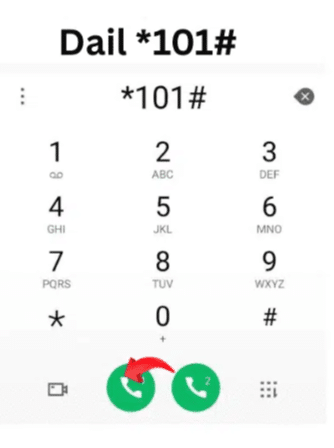
- Press the Call Button: Once the code is entered, you need to press the call button to start the request.
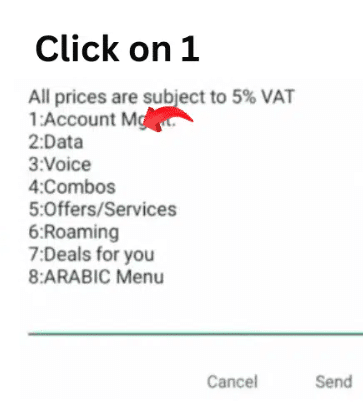
- Select Your Number: After you dial the code, a pop-up menu will appear on your monitor with many options. Select the one that includes your phone number.
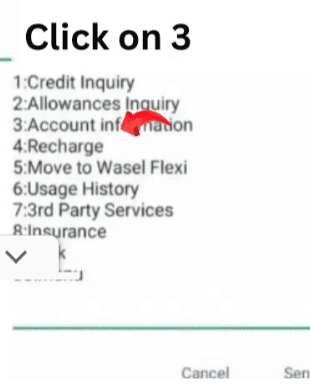
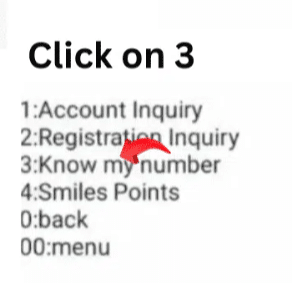
- View Your Number: After finding the number that you have, choose it to display your Etisalat phone number.
Check Using the Etisalat Website
Logging in to Your Etisalat Account
To get started, visit the Etisalat website ( https://www.etisalat.ae/en/onboarding/prepaid/your-account/logging-in.html )
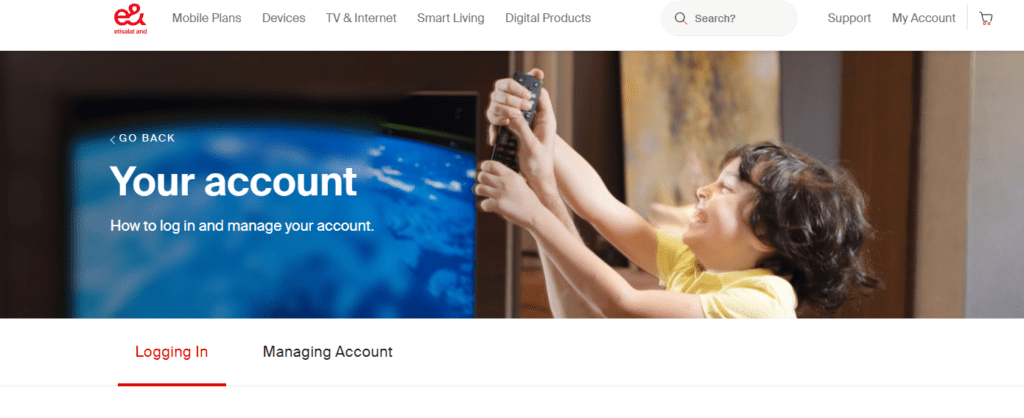
Navigate to the Billing Section
Once you sign in, locate the billing or account management. This will most probably be referred to as My Bills or Billing/Payments. ”
Downloading Your Latest Bill
In the billing section, there will be an option to view your latest bill or download it. Download the format most suited to your needs, e.g., PDF.
Finding Your Phone Number
Download the downloaded bill, and you are done. Your Etisalat phone number will be on display, generally, at the top or in the account summary section.
Look at Your Etisalat Paper Bill
Yup, good old-fashioned paper still has its place.
Locating Your Paper Bill
If you receive paper bills, you’ll find your Etisalat number printed on the physical copy sent to you via mail.
Reviewing the Bill Details
Open your most recent paper bill and look for your phone number. It’s typically mentioned at the top or within the customer information section.
Use the Etisalat App (iOS/Android)
Using your phone as your personal assistance is a smart idea.
Instructions
- First open the Etisalat App from either App Store or Google Play and then proceed to download it.
- Log in using your credentials.
- The Etisalat number will appear either on the account profile page or on the home screen.
Contact Etisalat Customer Support
Customer service serves as your backup option if other approaches fail.
What to do
- You can contact 101 by dialling it from any Etisalat phone or use their hotline.
- You must provide verification details including your ID number or your SIM serial number.
- Rest assured the customer service representatives will reveal your number to you.
Email support is an option but calling provides faster assistance.
Quick Comparison Table
| Method | Steps Required | Best For |
|---|---|---|
*101# USSD Code | Dial & select menu | Fast, no internet required |
| Online Account | Login → Billing → View bill | Desktop users, record keeping |
| Etisalat Mobile App | Install → Login → View account | Mobile-first users |
| Paper Bill | Grab bill → Look at details | Traditional users with physical bills |
| Customer Support | Call → Verify ID → Ask | Last resort / tech issues |
Tips to Check Your Own Number in Etisalat
1. USSD Code is the Fastest Option
*101# is the fastest and easiest method to locate your number. This USSD code is equally efficient even without an internet connection. Just type the code on your phone’s dial pad and press the button to call.
2. Save Your Number in Your Phone
Having your number successfully retrieved by the USSD code, you can then save it as a contact on your phone. This is a straightforward measure that guarantees that you will always have your Etisalat number, even if you forget it again sometime later.
3. Keep Etisalat’s Contact Information
To be always ready, it is good to have Etisalat’s phone numbers on your hand always. Regardless of whether you need help in getting your number back or have other questions, having Etisalat’s number or website link easily available to you can save you time and hassle. This information can be usually found on their official website or the statement of your monthly bill.
More Ways to Use Etisalat Codes and Support Channels
Once you have found your number, it helps to know the other official tools. The e& support page for postpaid plans lists several codes and channels at eand.ae. Note that the page is written for postpaid plans, so prepaid users should check the prepaid section of the official site.
Codes listed by e&
| Code | What it shows |
|---|---|
| 101# or *140# | Balance allowances |
| 170# | Data balance only |
| Text NP to 1012 | Package details |
| Text NP Balance to 1012 | Balance allowances |
Using the app and the website
The e& UAE app is available on the Apple App Store, Google Play and Huawei AppGallery, and the site offers a Know your etisalat UAE App section with video guides to the app features. If you prefer the website, you can log in through the Etisalat login page. Your number is normally shown on your account or profile once you are signed in.
Chat support
The e& support page links a Chat with Us option described as 24/7 instant support, plus a Contact Us page. If a code does not respond, chat is an easy second step before you visit a store.
Tips from my own use
- Save your own number in your phone under a clear name so you never need to look it up.
- Only share your number with banks and services you trust, and never share one-time passwords sent to it.
- If you change SIMs or phones, check that your number still shows correctly in the app after you log in.
If you only need the number once, the USSD route is the quickest. If you need it for a form, the app or website gives you a copy you can screenshot. Store it somewhere safe, because it often serves as your login or alert contact for banks and services.
Related guides
- How to Check Etisalat Postpaid Balance Instantly (2026)
- Etisalat Call Forwarding Codes & How to Cancel (2026)
- How to Unsubscribe Etisalat Services (Stop Hidden Charges)
FAQs About Etisalat Number Check
How Do I Know My Etisalat Number if USSD Doesn’t Work?
Check the app and log into your account or reach out to support. The USSD system should function unless there are network disruptions with your SIM. USSD normally functions provided you have an active and network-connected SIM.
Is Checking My Etisalat Number Free?
100%. There are no costs associated with any of these options.
Can I Check Someone Else’s Etisalat Number Using These Methods?
Nope. The privacy features of each method protect information exclusively within the particular device or account bound to that SIM.
What Are Some Other Etisalat USSD Codes?
Here are a few handy ones:
*121#– Check balance*170#– Recharge options*101#– Services menu (includes number check)
Read Also: How To Close Du Sim? A Quick Guide
Final Thoughts
Knowing your own Etisalat number serves as an essential requirement when you register on applications or establish bank alerts, or try to share your contact information. I have experienced the stressful situation of frantically searching through old receipts and dialers for your number, so avoid becoming like me.


