Obtaining a copy of your UAE visa is an essential process for residents and visitors alike. Whether you need it for official documentation, travel purposes, or personal records, downloading your visa copy has become incredibly straightforward with the UAE’s digital platforms. Below, I will guide you through the detailed steps using two primary methods:
- ICP Smart Services Website
- ICP Smart Services App
Additionally, I will provide insights into alternative methods and important considerations.
Method 1: Downloading Your UAE Visa Copy via the ICP Smart Services Website
The ICP Smart Services Website (Federal Authority for Identity, Citizenship, Customs, and Ports Security) provides an easy-to-use platform for downloading your visa copy.
Steps to Download Your UAE Visa Copy
1. Access the Official Website
- Open your web browser and navigate to the ICP Smart Services website at https://smartservices.icp.gov.ae/.
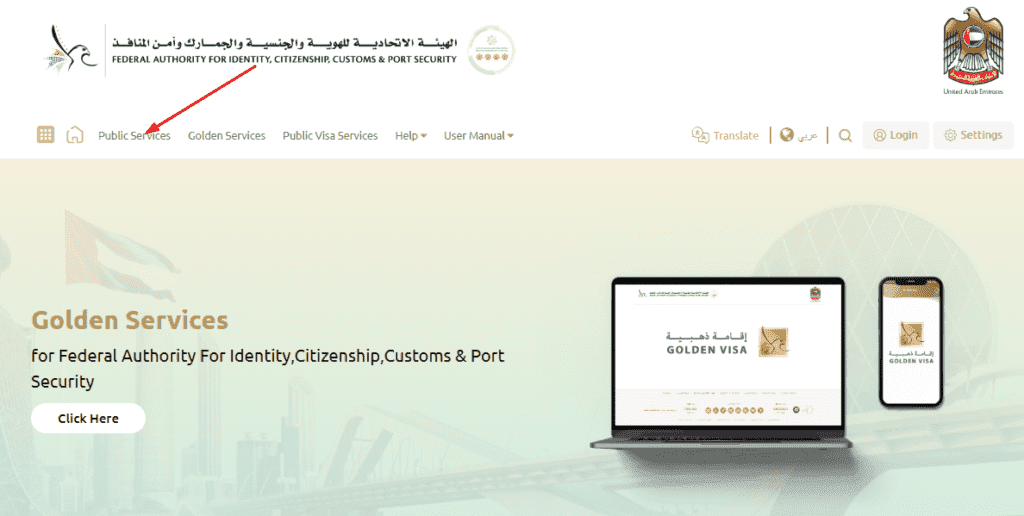
2. Navigate to Public Services
- On the homepage, locate the Public Services tab in the top menu bar.
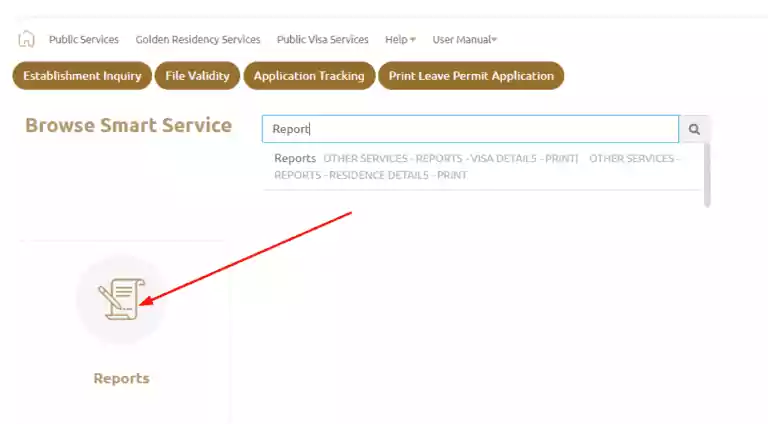
3. Select the Reports Option
- From the dropdown menu, choose Reports.
Read Also: Zirku Island Weather, Map, & ADNOC Offshore Insights
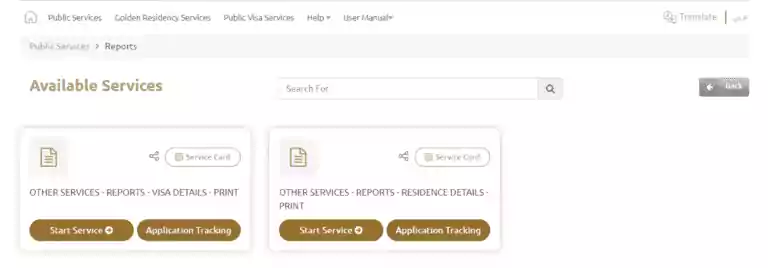
4. Choose Visa Details for Printing
- Select Other Services – Reports – Visa Details – Print to proceed.
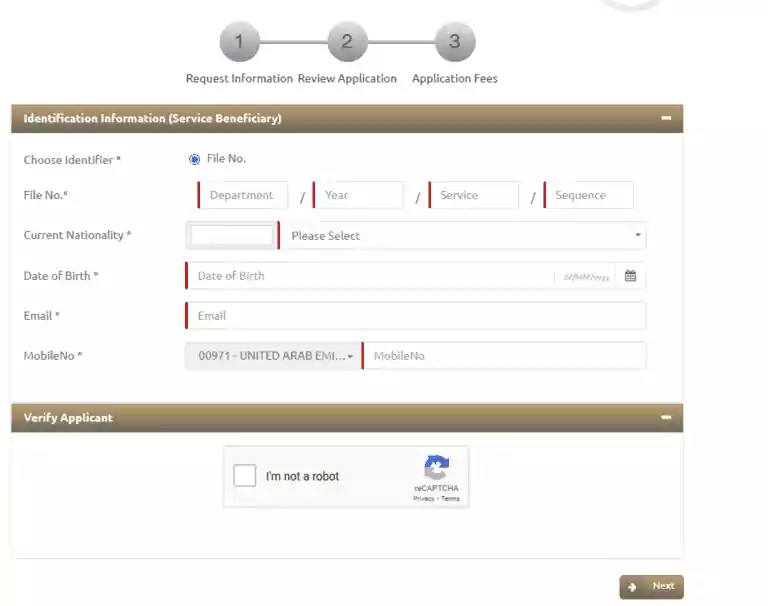
5. Enter Your Information
- Accurately fill out the required details, including:
- Passport number and type.
- Passport expiry date.
- Date of birth.
- Email address and mobile number.
6. Verification Process
- Double-check your information and click Next.
- The system will verify the entered details and retrieve your visa information.
7. Download Your Visa Copy
- Once the system displays your visa details, select the Download option.
- Save the file in PDF format to your device.
Method 2: Using the ICP Smart Services App
The UAEICP mobile app is a convenient alternative for accessing and downloading your visa copy. It is available on both the App Store and Google Play Store.
Steps to Download Your UAE Visa Copy
1. Download and Install the App
- Search for UAEICP in your device’s app store.
- Install the application.
2. Register or Login
- If you are a new user, register by providing the necessary credentials.
- Existing users can log in using their UAE Pass credentials.
3. Access Visa Information
- Once logged in, navigate to the Cards section in the app.
- Here, you will find your Emirates ID and UAE visa details.
4. Download the Visa Copy
- Locate your visa information and tap the Download button.
- The app will save the visa copy as a PDF on your device.
Additional Information
Both methods are user-friendly, but there are important considerations to keep in mind.
Fees
- According to The National (September 2024), downloading the visa as a PDF in the ICP Smart Services app or website shows no fee, while a printed, stamped copy costs AED 250 and takes two working days. Check the payment screen for the current amount.
- Ensure your payment method is ready if required.
Requirements
- Stable internet connectivity is essential for a seamless experience.
- A device such as a computer, smartphone, or tablet is required.
Verification Issues
- If you face verification errors, double-check your details, as minor discrepancies can lead to issues.
Alternative Options for Obtaining Your UAE Visa Copy
If you cannot download your visa copy through the above methods, other alternatives are available.
1. Visit an Authorized Typing Center
- Typing centers authorized by the UAE government can assist you in obtaining a printed copy of your visa.
- Provide your original documents and passport details for processing.
2. Customer Happiness Centers
- These centers are designed to help residents and visitors with government-related services.
- Locate the nearest Customer Happiness Center and request a visa copy.
Troubleshooting Common Issues
When attempting to download your UAE visa copy, you might encounter specific challenges. Here’s how to address them:
Issue 1: Incorrect Information
- Solution: Ensure your passport details and email address match those used during visa issuance.
Issue 2: App Crashes or Website Errors
- Solution: Update the app or try accessing the website on a different browser or device.
Issue 3: Payment Declines
- Solution: Confirm that your credit/debit card is active and supports online payments.
Tips for Managing Your UAE Visa Copy
1. Keep Digital and Physical Copies
- Save the downloaded PDF in multiple locations (e.g., cloud storage and local devices).
- Print a hard copy for official use.
2. Regularly Update Your Information
- Ensure your details are up-to-date on UAE government platforms to avoid issues.
3. Use a Secure Connection
- Always use a trusted network when accessing government portals to protect sensitive information.
What Changed With the Visa Sticker and Which Copy You Need
If you are wondering why you have to download a visa copy at all, it comes down to a change made in 2022. According to The National, visa stickers were discontinued and replaced by enhanced Emirates IDs as part of a drive to streamline services. Residents no longer need a residency visa page in their passport, but the visa can still be downloaded digitally or printed when a service asks for it.
Digital copy versus stamped copy
The National’s report describes two kinds of document, and the difference matters:
- Digital copy: install the ICP Smart Services app, log in with UAE Pass or create an account, tap Cards in the bottom menu, and download the visa as a PDF. Sponsored dependants’ documents appear there automatically, according to that report.
- Printed, stamped copy: some services require one. The report says to go to Public Services, then Reports, then the Residence Details print option on the ICP Smart Services website, enter your visa file number, unified number or Emirates ID number, and pay AED 250, with processing taking two working days. You can also request it at customer happiness centres. This is a different price from the AED 30 mentioned in this guide, so check the amount shown on the official ICP Smart Services site before you pay.
The UAE Pass route
A Gulf News guide to getting a copy of your residence visa adds a third route. You register your Emirates ID in the UAE Pass app, verify your identity with facial recognition, set a PIN, then go to Add Documents, Personal, and select UAE Residence Visa. For government centres it suggests the QR verification option, because the QR code confirms the document is authentic. It also suggests setting up UAE Pass in advance since it needs identity verification, and keeping your file number handy if you use the website.
Is the Emirates ID enough?
Often yes, but not always. The same guide notes that there are still cases where you may need to provide the residence visa document, so do not delete the PDF once you have it. When a bank, airline or embassy asks for a visa copy, ask them which version they accept, digital or stamped, so you only pay once.
Quick tips
- Use only the official ICP website or app and never enter your passport or Emirates ID details on a lookalike page.
- Save the PDF to cloud storage as well as your phone.
- If the details do not load, update the app or try another browser before visiting a customer happiness centre.
Related guides
- UAE Visa Types: Find the Right Visa for Your Needs
- UAE Resident: Explore 100+ Visa-Free Destinations in 2026
- Dubai Business Visa: Quick & Easy Guide for Your Next Trip
- Dubai Azad Visa: Apply Now!
- How to Check Visa Fine in UAE: Easy Online Guide
Frequently Asked Questions
Can I download someone else’s UAE visa copy?
- Answer: You can only download another person’s visa copy if you have their permission and the required details, such as their passport information.
What should I do if my visa details are not showing?
- Answer: Contact the ICP helpline or visit a Customer Happiness Center for assistance.
Is there an expiry date for digital visa copies?
- Answer: Digital copies do not expire, but ensure your actual visa is valid.
Read Also: Find Your Perfect Eid al-Fitr Mosque in the UAE
Final Words
Downloading a copy of your UAE visa is a straightforward process, whether through the ICP Smart Services Website or the UAEICP app. By following the detailed steps outlined in this guide, you can effortlessly obtain a digital or printed copy for personal or official use.
Remember to store your visa copy securely and keep your details up-to-date to avoid complications. With these methods and tips, you’ll always have access to your UAE visa whenever you need it.