
Talabat is a popular UAE-based on-demand food delivery and ordering app that enables people to place their food, grocery, medicine, flower, or day-to-day orders from the restaurants and stores that participate in Talabat. Talabat website/app’s user can shop, search for any merchants nearby, compare price, avail any merchant discount vouchers and make the payment using his preferred payment method before receiving the ordered products at his favourite address.
Learn how to order, use promo codes, verify your delivery charges, sign up for Talabat Pro, follow your delivery, claim refunds, and contact customer service in this guide.
What Is Talabat in the UAE?
Talabat, a digital food delivery and on-demand service, connects users to restaurants, supermarkets, pharmacies, flower shops, and any other retail locations offering food on-demand services. Where products can be ordered, it enables citizens in those areas to go online and have them delivered to their preferred addresses.
Customers can access Talabat through its official website or mobile application. After entering their delivery location, they can browse available merchants, view menus or product listings, add items to their baskets, and complete their orders.
How to Use Talabat in the UAE
Talabat is user-friendly to use. Orders can be made via its official website or its mobile app, in just a few simple steps.
1. Download the Talabat App or Visit Its Website
First of all, download Talabat UAE from the Google Play Store or the Apple App Store.

Download the official app. If an unofficial version is available, it may have errors that will cause it to fail to function correctly.
2. Create an Account or Sign In
Log in to your existing application and open it. If this is your first time as a customer, register and enter details as requested.
3. Enter Your Delivery Location
Type in your area, street, building, or other requested address information to choose your delivery location.
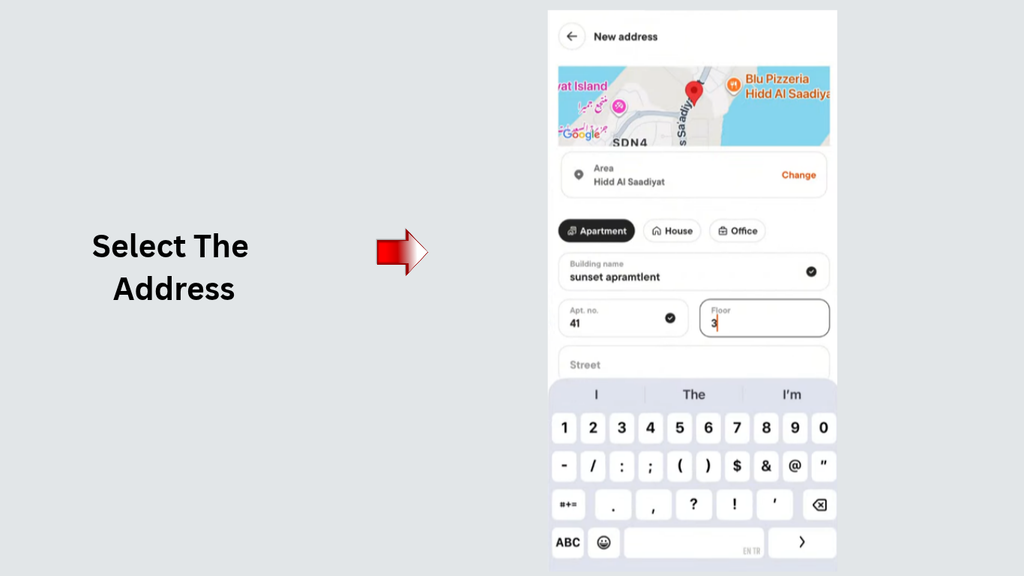
An address is crucial as Talabat uses it to pinpoint restaurants, stores, delivery options, and other pertinent charges that are located near you!
If your building has a designated room, floor, or apartment number, include that so that it will help the delivery rider locate your building.
4. Choose a Restaurant or Store
After selecting your area, Talabat will show you restaurants or stores that you can go to.
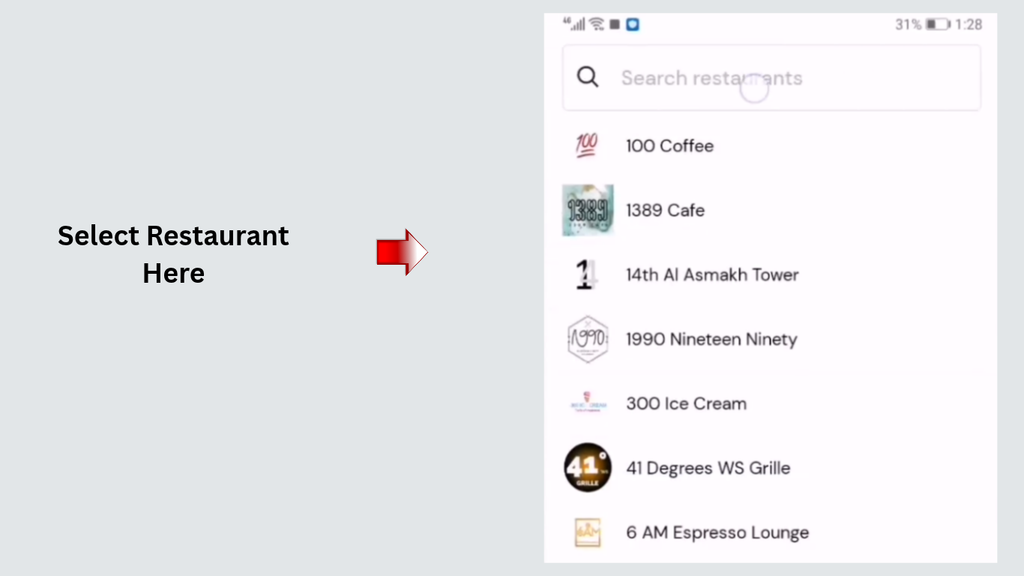
Access to various categories, search for specific restaurants, menus, and available products can be checked out.
5. Add Items to Your Cart
Choose the food or products you want to order and add them to your basket.
6. Apply a Voucher and Select a Payment Method
Review your basket and check whether any eligible discount vouchers or promotions are available.
When ordering, a valid promo code might be entered in the provided field and can be applied prior to order completion.
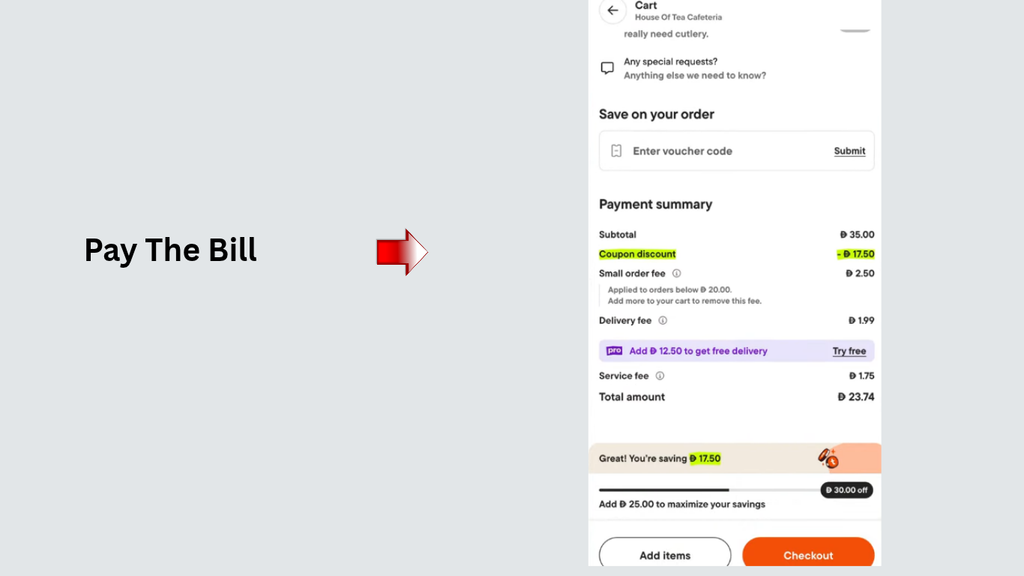
7. Confirm and Track Your Order
Check all the details of the order summary—item price, delivery fees, service fees, discounts, and total order amount.
How to Use Talabat Vouchers and Promo Codes in the UAE
Talabat provides discounts and vouchers with the aim of cutting eligible order costs. These offers could be offered via the app, special restaurants, campaigns, or selected partner programmes.
Certain reductions may be for new customers only, particular merchants, at least a certain amount spent in the basket, or with a certain kind of payment.
Where to Find Talabat Promo Codes
You can look for available Talabat promotions through these sources:
- Talabat application: Check the offers or promotions section for available discounts.
- Restaurant promotions: Some restaurants offer discounts on selected menu items or qualifying orders.
- Talabat notifications: Check official app notifications and promotional messages.
- Partner offers: Banks and other participating partners may provide special promotions for eligible customers.
- Official campaigns: Look for discounts advertised through Talabat’s official website or verified social media channels.
Avoid relying on random promo codes from outdated coupon websites. A code appearing online does not mean it is currently valid in the UAE.
How to Apply a Talabat Voucher
Follow these steps to apply a voucher during checkout:
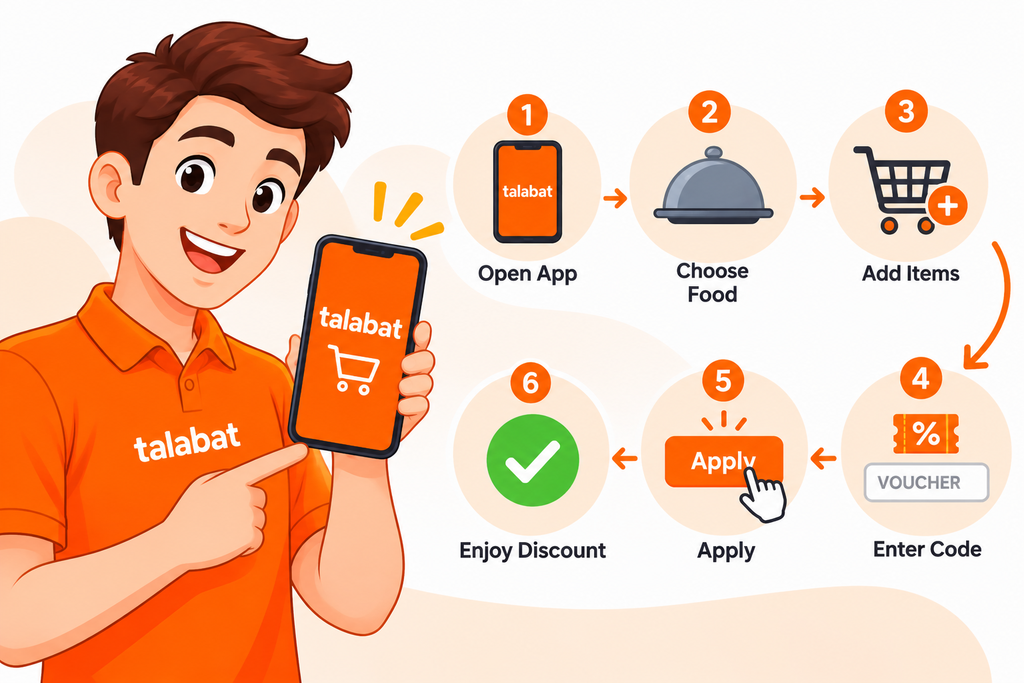
- Open the Talabat app or website and sign in to your account.
- Enter your delivery address and choose a participating restaurant or store.
- Put items on the list that you’re interested in.
- Open the cart, and find the field to type the voucher or promo code.
- Fill in the discount code that is provided and click on “Apply”.
- Verify if you’ve seen a discount for you total order.
- Review the remaining charges and confirm your order.
Don’t believe that any discount has been applied without it being listed in the order summary.
Talabat Delivery Fees in the UAE
Talabat delivery fee in the UAE isn’t standardized for everybody and every Talabat order. May be possible to change based on the area of delivery and the distance from the merchant, service quality, promotions etc.
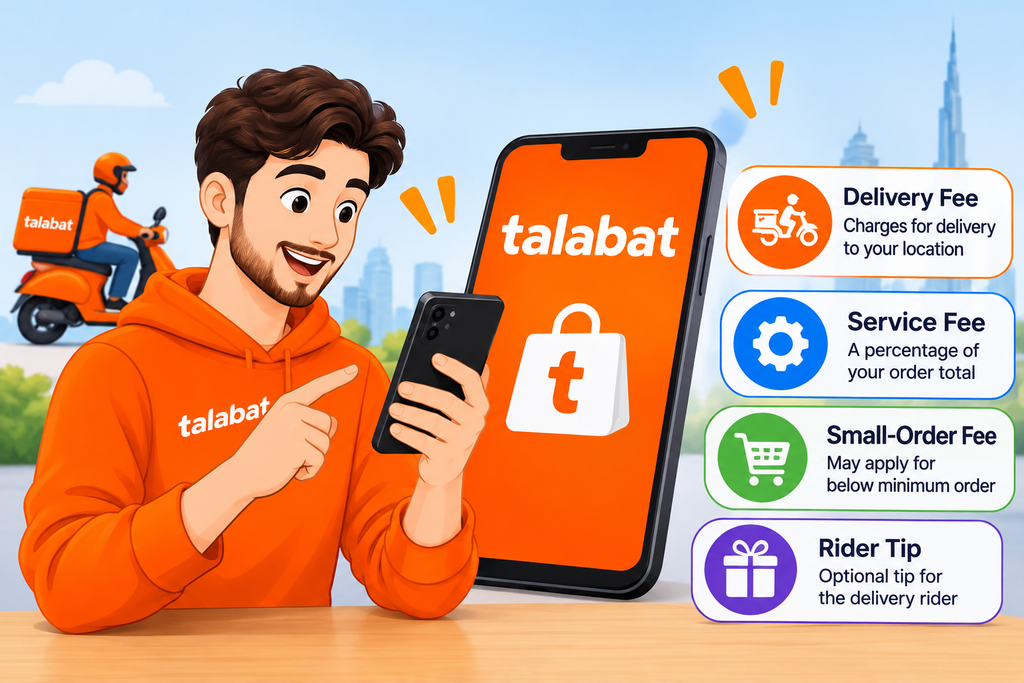
1. Delivery Fee
The costs associated with delivering an order to the address you specify from a restaurant or store are called the delivery fee.
Talabat lists its delivery fees on its website, and these fees may differ depending on the distance of the customer to the merchant. Generally, the nearer a good is delivered, the cheaper it will be.
2. Service Fee
A service fee is an additional amount charged that may be visible during checkout.
According to Talabat’s fee explanation, it states that this is a percentage of the total of the basket before discounts are given. The actual amount due will be in an order summary – based on applicable fee calculations.
3. Small-Order Fee
This is subject to a small order fee where applicable if the basket fails to meet the minimum order basket value criteria.
Review the merchant’s minimum order and checkout summary prior to ordering.
4. Optional Rider Tip
You may be able to tip the delivery rider.
A rider tip is in addition to the delivery and service charge. It is not required, and customers may choose to include one or not.
How Much Does Talabat Pro Cost?
The pricing for Talabat Pro membership is subject to change and depends on the country, option, and the promotion.
Before subscribing, subscribe to the latest price that is published in your UAE Talabat app, rather than the old price published by other sites.
Is Talabat Pro Worth It?
For those who order food from participating restaurants and stores on a regular basis, Talabat Pro could be worth it.
The usefulness, however, is contingent on the frequency of use of the membership, and it is contingent on existing merchants being eligible for the benefits the membership offers.
For instance, a customer who places multiple orders each month that are eligible. If savings from the delivery and other benefits are greater than the subscription, it may be worth joining the membership.
You can use this simple calculation:
Net savings = Eligible delivery fee savings − Membership cost
To make fair comparisons, only look at the orders that fall under the category of qualifications for the membership benefits.
How to Cancel Talabat Pro
To stop receiving emails from Talabat, you can cancel all Talabat emails using your Talabat account.
- Open the Talabat mobile application.
- Sign in using your subscribed account.
- Open the account or membership settings.
- Find the Talabat Pro subscription section.
- Follow the available cancellation instructions.
- Check the confirmation and membership expiry date.
Talabat’s published Pro terms are that members automatically renew every 30 days, unless they cancel. Any cancellation must be in effect at least 24 hours prior to date of renewal to prevent paying the next charge for the membership.
How to Pay on Talabat in the UAE
The payment method available to you may be dependent on the merchant, order, and checkout condition.
Talabat accepts the following types of payments online in the UAE:
- Visa.
- Mastercard.
- American Express.
- Apple Pay.
- Other payment options displayed at checkout, where available.
Additionally, if the merchant and options listed in your account allow, cash payment might also be possible for qualified orders.
How to Make an Online Payment
- Select your restaurant or store.
- Add the required items to your basket.
- Proceed to checkout.
- Review the order amount and applicable charges.
- Select an available payment method.
- Enter or confirm the required payment details.
- Complete the payment and check your order confirmation.
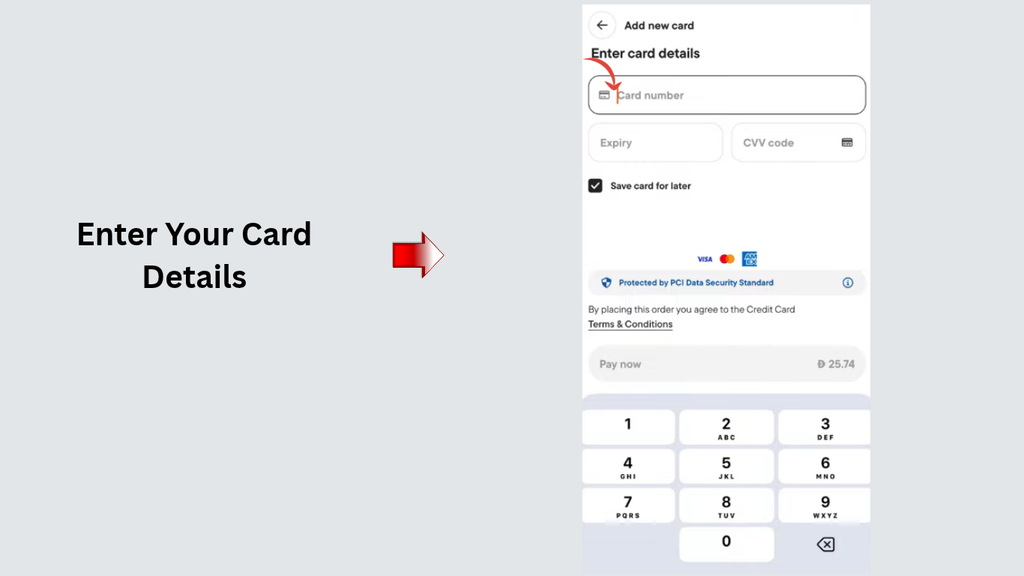
What to Do If Your Talabat Payment Fails
If your payment does not go through, first check whether the amount has been deducted from your bank account.
You should then:
- Check your internet connection.
- Verify that your card details are correct.
- Confirm that your bank has not declined the transaction.
- Check whether your payment method is supported.
- Avoid repeatedly attempting payment without checking the previous transaction.
- Contact your bank or Talabat support if the problem continues.
If money has been deducted but the order is not confirmed, keep the transaction reference and payment confirmation. Contact customer support for assistance.
How to Request a Refund from Talabat
Follow these steps to report an order problem:
- Open the Talabat application.
- Go to your order history.
- Select the order with the issue.
- Open the Help or Support section.
- Choose the relevant problem, such as missing items or an incorrect order.
- Explain what happened clearly.
- Upload photographs or supporting information if requested.
- Submit your request and follow the support team’s instructions.
Keep your order details and payment confirmation until the issue is resolved.
Tips to Save Money When Ordering from Talabat
If you’re not mindful of delivery fees, promotions, and amounts per order, using Talabat can cost you more than you think.
Here are practical ways to manage your spending:
1. Check Available Vouchers
Check out all the promotions that may be available, and if you are eligible for a discount for your order, then you should ask for it before confirming any orders.
Always check the fine print with terms and conditions, which require a minimum purchase and specify which restaurants are eligible.
2. Compare Delivery Fees
Even for the same type of food or the same product, the merchants may differ in their delivery charges.
Check out restaurant ordering totals before making a selection.
3. Consider Talabat Pro
If or when there is a chance to have an eligible order placed regularly, then consider the opportunity and whether the savings in delivery and other advantages are worth the membership fee.
Unsubscribing shouldn’t be dependent upon the delivery promise. Be sure to review minimum order size and participating merchants.
4. Look for Restaurant Promotions
In some stores, the meals are discounted for certain foods, meal combinations, certain orders, etc.
Before ordering – compare the discounted price versus its regular menu price.
Frequently Asked Questions About Talabat in the UAE
1. What is Talabat in the UAE?
Talabat, also known as tallat, is a Dubai-based online ordering and delivery firm that is designed to bring people in the UAE into touch with restaurants, supermarkets, and pharmacies.
2. Is Talabat available across all seven emirates?
Yes, Talabat has services available in all 7 UAE emirates, such as Abu Dhabi, Dubai, Sharjah, Ajman, Umm Al Quwain, Ras Al Khaimah, and Fujairah.
3. How do I order food through Talabat?
Open the Talabat application or website, sign in, enter your delivery address, select a restaurant, add food to your basket, and apply an eligible voucher if available.
4. How can I get Talabat discount codes in the UAE?
Offer Section on the Talabat App, restaurant offers, official Talabat offers, and eligibility partner offers.
5. Is there a delivery cost in the UAE for 5 Talabat?
Yes, some delivery charges can be as much as 20% depending on the seller, shipping method, and distance.
Read More: WPS in UAE: Salary Rules & Status Check (2026)
Final Words
Talabat has made it easier for UAE customers to get food, groceries, medicine, flowers, and other products with one click on the internet. It doesn’t matter whether you are just a new customer or you are a regular customer, the knowledge of how to order, redeem a coupon, know about deliveries’ costs, and use Talabat Pro will help you make yourself a better buyer!
Please contact Talabat’s official customer service if you are missing any item or it takes longer than expected to arrive or it is not the correct order or there is a payment problem.