
Want to transfer out of your Bank account? There is no reason to be stressed about closing your Bank account in the UAE. Moving to a new bank, going overseas, or merely no longer needing this bank account are all good reasons to go through the proper closing procedure and not to risk paying a fine or facing a problem with pending transactions.
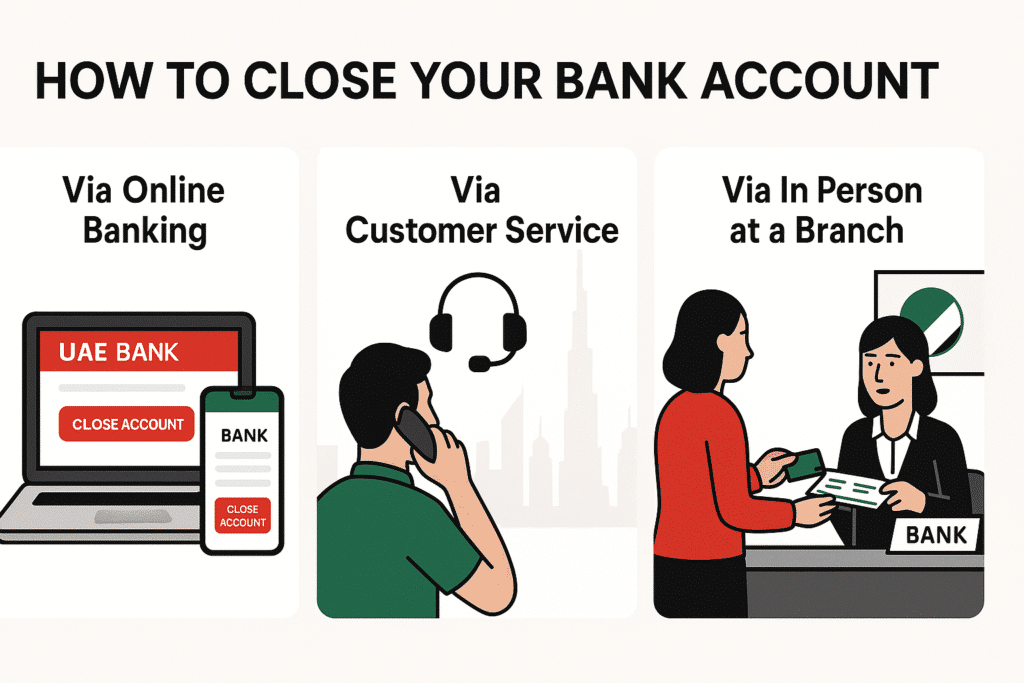
This is the ultimate guide on how you can close your Bank account in 3 simple ways:
- To see a branch offline
- Making a phone outcall
- Making the request using online banking
Method 1: Closing the Account in Person at a Branch
Closing your Bank account in person is the best, fastest, and safest approach you can make, in this case.
Step 1: Clear Any Pending Transactions
Ensuring that your account is clean is something you cannot do without before you intend to even set foot in the branch. This means:
- Wait until any cheques that you have issued are cleared.
- Take away whatever is left over – Money or just shifting it to some other account.
- Cancel standing orders – In case of automatic payments or direct debiting, cancel them to stay out of trouble.
Failure to undertake this step runs the risk of your closure not matching the time of your exit.
Step 2: Prepare Required Documents
There are documents you will have to take along. Without them, the bank won’t do your closure:
- Valid Emirates ID (for UAE residents)
- Passport + visa page (for non-residents)
- Cheque book (if issued)
- Debit card (linked to the account)
- Account closure request form (you’ll fill this out at the branch)
Step 3: Visit the Nearest Bank Branch
When all this is prepared, go to the nearest branch during working hours. When you are here:
- Visit the service desk for the customers
- Inform them that you would like to shut your account
Step 4: Fill Out the Account Closure Form
In the form that will be provided by the representative, he/she will:
- Give your account number
- State your rationale for closure.
Step 5: Settle Any Fees or Dues
Some of them come with closure fees when;
- Within 6 months of having the account open, you are closing it
- You have been short of the minimum on your balance for far too long
Check and ensure that you pay the dues as soon as possible.
Step 6: Receive Closure Confirmation
When all this is done:
- The bank will give you a closure acknowledgment
- Processing time is often between 2-5 working days
- In case you have remaining funds, they would be paid to you or would be moved to a different account
Read Also: F25 Bus Dubai: AED 3 Ride from Metro to Al Quoz (Full Guide)
Method 2: Closing the Account via Phone Banking
In cases where you may be unable to visit a branch physically, you can close through the phone banking of the Bank.
Step 1: Call Customer Service
- Inside UAE: Call 600 522 229
- International: Call the international service @ U.A.E. from outside the U.A.E.
Step 2: Verify Your Identity
The representative will inquire your confirmation:
- Emirates ID number
- Account number
- Security Question answers (e.g. Last amount of transaction)
Step 3: Request Account Closure
- Let them hear in no uncertain terms that you wish to shut your account.
- They can even want a signed closure form to be sent by email or cared.
Step 4: Complete Any Additional Requirements
You can be requested to:
- Fax your ID copies
- Clear existing fees before the closure processing is done
After it has been done, you will be notified through email or SMS.
Method 3: Closing the Account via Online Banking
Through online banking or the mobile app, some of the Bank accounts can be closed.
Step 1: Log in to Online Banking
- Go to the Bank site online, or you can download the mobile app.
Step 2: Navigate to the Account Services Section
- Search the menu for the option called “Close Account” or “Service Requests.”
Step 3: Submit Closure Request
- Log in with your account number
- Authenticate yourself with an OTP on a registered mobile number
Step 4: Wait for Processing
- The bank can call you to seek confirmation on the request
- It may take 5 business days to process
Important Things to Know Before Closing Your Account
In the UAE, it is not that simple to close a bank account by signing a form. I shall put a few points to be considered critically:
- There is a minimum balance you are supposed to have before you close, and there is a fee associated with this
- Credit facilities- At least, you must clear your loan or credit card facility with the bank.
- Standing instructions- Cancel them to prevent bounced payments
- Linked accounts – Any associated accounts with your main account (savings, deposit, or investment account) need to be dealt with separately
- Closure fees – On the official site of the Bank (or by calling customer care), check the latest charges for closing an account
My Pro Tips for a Smooth Closure
This is what I will advise you to do to make it smooth:
- Go to the branch when you can- It is much quicker and probably less prone to error
- Salary credit close behind it -When your employer credits salary to this account, then change the bank details first
- Use past statements as a backup- You will later need them as tax or visa records
- No last-minute scramble- Get started on the process a week or so in advance of when you want it done
Before You Close: Liabilities, Clearance Letters and Your Rights
The steps above cover the closure itself. Here are the points that most often cause delays, based on a Gulf News guide on closing a UAE bank account and the practical checks I would add.
Clear everything that is linked to the account
- Bring the balance to zero or into credit, and repay any loans.
- Close credit cards and overdraft facilities. An open credit card linked to the account will block closure.
- Pay outstanding fees, then cancel or move salary transfers, direct debits and standing instructions.
- Move remaining funds to another bank or withdraw them, and hand back the debit card and unused cheque leaves.
Ask for a clearance letter if you are leaving the UAE
The Gulf News guide advises requesting a clearance letter in writing when leaving the country, and notes that these letters are not always issued automatically. If you need one for visa cancellation or an employer, ask for it explicitly and keep the SMS or email confirmation of closure. Wait until your final salary and end-of-service payment have been credited before closing, or you may have to open an account again just to receive them.
Fees differ from bank to bank
The same guide mentions that closing shortly after opening can carry a charge, and that minimum-balance fees can keep running until the closure is processed. It also says some banks accept closure requests through their apps but may still ask for a branch visit for original documents. Because policies are set by each bank, read your account terms or ask the branch for the current charge in writing, rather than relying on a figure quoted online.
If the bank closes your account
Sometimes it is the bank that ends the relationship. A Khaleej Times legal explainer reports that, under the Consumer Protection Regulations issued by the Central Bank in Circular No. 8 of 2020, banks must give 60 calendar days’ written notice before closing an account, with exceptions where they suspect financial crime or must meet compliance requirements. The article is dated October 2021, so check the current rules. If you believe a closure was handled wrongly, the explainer suggests first checking your registered email, then complaining to the bank in writing, and then escalating to the Consumer Protection Department of the Central Bank of the UAE. This is general information, not legal advice.
Whichever way the account closes, keep copies of the closure form, the zero-balance confirmation and any clearance letter for at least a few months.
Related guides
- FAB Balance Check 2026 – 7 Official Ways (ATM, SMS, App)
- Mashreq Bank Near Me in Dubai | Branch & ATM Locator
- Close Mashreq Bank Account Online – Quick, Easy & No Fees!
- How to Open a UAE Bank Account as a Non-Resident (2026)
- Transfer Money from C3 Card to UAE Bank Instantly (2026)
FAQs
1. Can I close my Al Hilal Bank account via the Internet?
Some of the account types are indeed available to close via online banking or the mobile application. Log in and go to Account Services, Close Account, and read the instructions.
2. What is the time to close the Al Hilal Bank account?
The application normally takes 2-5 working days since making yours in person and paying all dues.
3. Do you charge to close an Al Hilal Bank account?
The closure is free in case your account exceeds the minimum balance and is more than 6 months old. Otherwise, there can be a small fee.
4. Which documents are required to close my account?
You will require your Emirates ID or passport, cheque book and debit card, and the account closure form.
5. Am I able to deactivate my account outside the UAE?
Yes, you can just call the customer service and do the phone banking stuff. They can request emailing or couriering scanned documents.
Read Also: F41 Bus Timings Today, Route, and Fare Guide [2026]
Final Thoughts
When you understand how to go about it, it is easy to close your Al Hilal Bank account. As to whether to do it in person or via phone, or online, just be sure that you are ready with the right documents and that there are no pending transactions or dues.
Use the approach that best fits your case, and your account will be closed within only a few days without wasting much of your time and without causing any useless delays.


