DU mobile users in the UAE must renew their SIM registration to prevent service disruptions when using their mobile phones. The government regulation mandates periodic checks of user information thus making this process essential for everyone. DU enables its customers to perform SIM registration renewals by using their official website and mobile application.
In this detailed guide, I will walk you through the entire DU SIM renewal registration process, step by step, so you can complete it effortlessly.
Method 1: DU Website
Step 1: Visit the DU Website
- Users should navigate to DU’s official website through www.du.ae.

Step 2: Log in to Your Account
- Select the “Login” option which sits on the top-right portion of the main page.
- You need to input your DU mobile number together with your password to access the system.

- If you don’t have an account, click on “Register” to create one.
Step 3: Navigate to SIM Registration/Renewal
- Access your “My Account” or “My Services” section once you finish logging into your account.
- Choose the option that says “Update ID” within the DU website.
Step 4: Verify Your Details
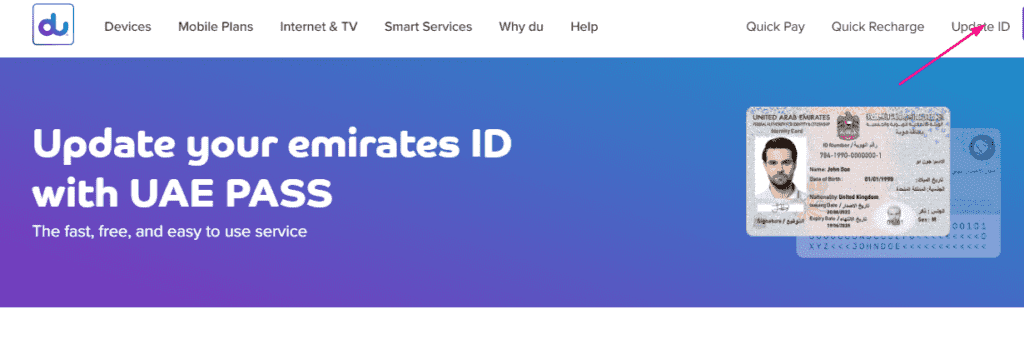
- You need to fill in your Emirates ID or passport information when requested.
- Verify that all your personal data, including name and address, appears accurately on the registration form.
Step 5: Upload Required Documents
- The submission process requires a hand-drawn or digital image upload of the front and back pages of your passport.
- Follow the system requirements to add a scanned passport photo.
Step 6: Submit the Request
- Check every entry you have provided.
- After checking all information, you can click Submit to make yourSIM renewal registration permanent.
Read Also: Find Your DU Mobile Number in UAE (Fast & Easy Methods)
Method 2: DU Mobile App
Step 1: Download the DU App
- Open the Google Play Store (Android) or App Store (iOS).
- Entrance into the Google Play Store allows you to search for “DU” before downloading the official DU application.

Step 2: Log in to Your Account
- Launch the DU application, then authenticate with your DU mobile phone number and your password.
- To create an account, choose the “Register” option after tapping it.
Step 3: Go to SIM Registration/Renewal
- Access the application’s “Services” or “My Account” section.
- Search for either “SIM Registration”, “Update SIM Details”, or “SIM Renewal” options within the app interface.
Step 4: Verify Your Details
- You must input your Emirates ID documentation together with your passport data.
Step 5: Upload Required Documents
- Open your camera application and take high-quality photos of your Emirates ID front and back or passport.
- If required, upload a passport-sized photograph.
Step 6: Submit the Request
- Review all the details you have entered.
- The registration process for SIM renewal ends with the selection of the “Submit” option.
Step 7: Confirmation
- You will get a confirmation of the process through SMS or email communication.
- Waiting time for approval normally spans from a few hours up to one whole day.
Why du Asks You to Update Your ID, and Another Way to Do It
Many people only discover this requirement when a message arrives warning that their line may be suspended. It helps to understand the reason and the options, including one route through UAE Pass that is not mentioned above. The details below are from a Gulf News guide updated in September 2023, so confirm the current process on the du website.
The reason behind the request
According to Gulf News, updating your Emirates ID is a mandatory requirement under the registration policy of the Telecommunications and Digital Government Regulatory Authority (TDRA). If you do not update it, the article says all mobile numbers or accounts linked to that Emirates ID can be suspended and disconnected. It also notes a grace period of 60 to 90 days depending on the provider, and does not state the exact period for du. The regulator publishes its rules at tdra.gov.ae.
Three channels, not two
The same guide lists three routes: the du website, the du app, and du stores. If you prefer not to upload photos, or the upload keeps failing, a store visit with your original Emirates ID is the fallback.
Using UAE Pass in the du app
The guide describes an app route that needs a UAE Pass account with your renewed Emirates ID added as a document. The steps it gives are:
- Log in to the du app with UAE Pass.
- Tap the menu icon at the bottom of the screen, then tap Update ID and choose to log in with UAE Pass.
- Select the mobile numbers you want to renew and tap Continue with UAE Pass.
- In the UAE Pass app, tap Allow Document Sharing.
- Return to the du app and tap Proceed.
- Wait for the notification that the request is being processed, and then for the SMS confirming that the renewal is complete.
For the website route the guide points to myaccount.du.ae, where you choose Update ID, enter your mobile number and the OTP, upload a copy of your Emirates ID, and select the account linked to the number. You then get one SMS when the request is submitted and another when validation is finished.
How long it takes and common snags
The guide says du takes up to 48 hours to validate your Emirates ID after submission, which is longer than the few hours mentioned in some summaries, so submit well before any deadline. Common reasons for delays include:
- A blurry or cropped photo of the card
- The new Emirates ID not yet added to UAE Pass
- Submitting under a different account than the one linked to your number
- Several numbers registered on one Emirates ID, where each line may need to be selected
If your Emirates ID itself has expired, renew the card first through the Federal Authority for Identity, Citizenship, Customs and Port Security at icp.gov.ae, then update your SIM. For plans, store details and support, start from the official du website.
Related guides
- Etisalat 9 Fils/Min International Call Offer + Codes
- Etisalat UAE Data Plans – Daily Codes & Unlimited Deals
- Close DU SIM in 2026: Easy Deactivation Guide
- Etisalat SIM Renewal Online – Avoid Service Cutoff Now
- Cancel Botim Subscription in Du Instantly – Stop Now!
Frequently Asked Questions (FAQs)
1. Why do I need to renew my DU SIM registration?
Periodic updates of telecom user details remain mandatory for UAE government regulations, which preserve security and maintain compliance.
2. How long does it take to renew my DU SIM registration?
The DU SIM Subscription renewal will be processed during a time span of few hours to one day after the submission.
3. What happens if I don’t renew my SIM registration?
SIM renewal expiration causes your services to stop working and your SIM to become deactivated.
4. Can I renew my DU SIM registration without an Emirates ID?
No, a valid Emirates ID or passport is required for renewal.
Read Also: Du Balance Transfers: Guide & Top-up Methods
Final Words
The online procedure for renewing your DU SIM registration takes minimal time and presents easy accessibility. The steps for renewing your DU SIM registration take only a few minutes and exist on both the DU website and the mobile app platforms.
You should keep your Emirates ID or passport ready, along with following the instructions precisely to prevent delays in DU SIM renewal registration.


